All that data you collect for your business should make a big difference to your business through smarter decisions and impactful actions. However, outdated, labor-intensive integration processes are still a big hurdle in getting value from data. So, how can you overcome the bottlenecks and deliver analytics-ready data to all areas of your business in real time?
With more data pouring in from more sources than ever before, modern-day businesses need their siloed data, stored in disparate sources, to be easily accessible in a centralized data repository.
With data integration, you can combine information from several apps into a single unified source. When you implement the right data integration methods, you can streamline workflows, automate to easily access and extract valuable insights, and stay on top of your operations in real time to make better decisions faster.
In this blog, you’ll discover popular data integration techniques and technologies. Gain practical insights to create a robust data integration strategy and harness the full potential of your data to drive strategic decision-making.
Data Integration Techniques Every Business Should Know
When your business needs to process data spread across disparate internal and external sources, you need to choose modern data integration techniques that efficiently cater to your unique business requirements. Depending on the complexity, disparity, and number of data sources to be integrated, you can choose from any of the following types of data integration methods.
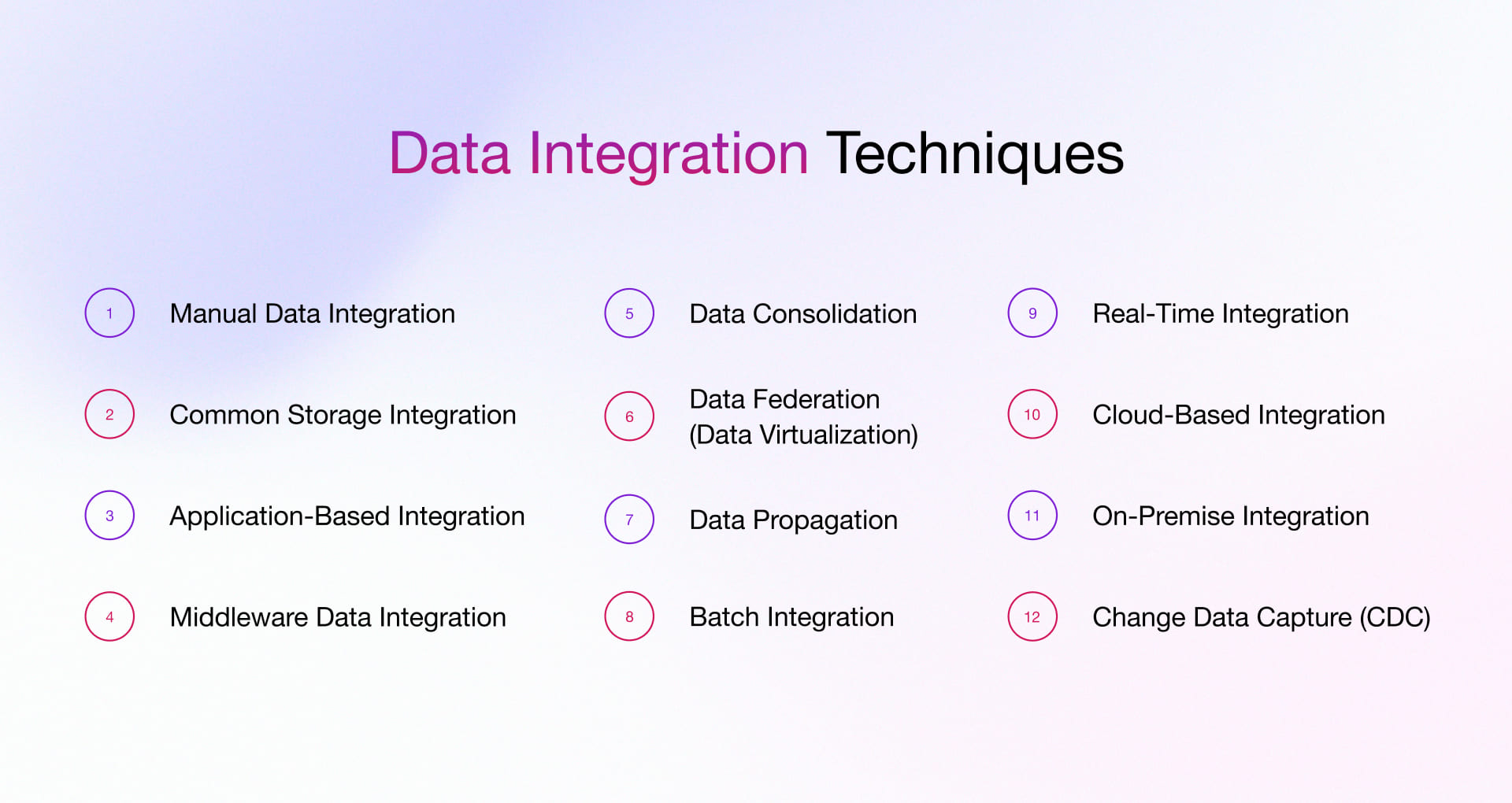
#1 Manual Data Integration
With this method, you can formulate your data integration methods using hand-coding and custom code to organize and integrate siloed data. This technique is an excellent alternative for businesses that only need to integrate information from a few source systems and are rarely required to replicate data from apps to a target source.
The downside of this approach is that it needs human intervention, which often leaves it susceptible to errors. Also, this approach can get challenging if you want to add more data sources later and scale up.
Pros
- It saves money and lets you start right away.
- Enables you to customize your data integration as and when needed.
Cons
- Takes up a lot of time and requires advanced coding skills.
- It does not work well with large or dynamic data sets.
Good for
- Small projects or scenarios where you need to customize your data.
#2 Common Storage Integration
This manual data integration approach that provides complete control and flexibility to manage your data at your ease and convenience. However, it is advisable to be careful about data quality and precision because errors in your code can result in substantial problems later.
Pros
- Gives a consistent view of data, making it easier to manage and analyze.
- Makes data available for different decision-makers.
Cons
- It takes time and resources, especially with large amounts of data.
- It costs a lot to store and maintain data.
- Needs strict data quality control.
Good for
- Companies that want to analyze their data quickly with a unified view.
- Situations where data from different sources must be stored and accessed in one place.
#3 Application-Based Integration
This method ensures seamless data sharing and integration between different software applications. You can use web services, message queues, or APIs (application programming interfaces) to transfer directly from one app to another. The key advantage of integrating applications is that it helps eliminate data silos and guarantees all the apps access the same current and pertinent data. This ensures that your software tools collaborate flawlessly, enhancing your overall productivity. Our application integration services help businesses synchronize their applications, eliminate silos, and improve real-time data access across systems.
Pros
- It enables real-time data integration, which means all apps have access to the most updated data.
- It gives a comprehensive view of integrated data and facilitates easy information exchange.
Cons
- Careful management is needed to ensure data security during the exchange process.
- It requires significant technical expertise for the setup and management of the integrations.
Good for
- Businesses running several software apps that need data sharing and synchronization.
- Businesses with near-real-time data integration needs.
#4 Middleware Data Integration
This is a popular technique for integrating data from different systems. It involves using middleware applications that act as intermediaries between systems, translating and routing data as needed. Some of the standard middleware data integration types are,
- Message-Oriented Middleware (MOM)
- Service Oriented Architecture (SOA)
- Enterprise Service Bus (ESB)
- Extract, Transform, and Load (ETL)
- Application Programming Interfaces (APIs)
Pros
- Enables smooth data flow among various systems.
- Provides easier data access across multiple systems.
Cons
- Needs expert knowledge for installation, customization, and maintenance.
- The choice of suitable middleware for specific business needs can be complex and time-consuming.
Good for
- Businesses with diverse systems or applications that need efficient communication and data exchange.
- These are situations where multiple source systems have to interact frequently or in real-time.
- Situations where integration of old systems with new ones is needed.
#5 Data Consolidation
This approach combines information from different sources to create a single data hub that data analysts can utilize for analytics and reporting. It also functions as a data supplier for subsequent applications. What sets this approach apart from other data integration types is its ability to swiftly collect data from diverse sources and seamlessly transfer it to the data repository. Minimizing this data latency makes the information fresher and more relevant for business intelligence and analytics tasks. In simple terms, you can access up-to-date information more quickly, essential for making well-informed decisions.
Pros
- Improves data consistency and format, making data management more efficient.
- Can help save data storage costs.
Cons
- For large amounts of data, it is slow and resource-intensive.
Good for
- Businesses looking to lower storage costs.
- Situations that require data duplication and inconsistency.
#6 Data Federation
This data integration technique, also called data virtualization, creates a single virtual database with a unified data model from different data sets with different models. Data federation differs from real-time data integration, which continuously combines data into a centralized storage. Instead, in the case of Data Federation, when users request specific information, a federated virtual database delivers data on demand.
Pros
- Saves additional data storage space.
- A low-cost approach
Cons
- It may be challenging to establish and maintain due to the virtual nature of integration.
Good for
- Situations where data should be accessed and analyzed in its original form without being moved or transformed.
#7 Data Propagation
This data integration method involves moving data from a central enterprise data warehouse to various data marts, with necessary transformations being applied. As the data in the warehouse is continuously updated, these changes are disseminated to the original data mart either synchronously or asynchronously. Enterprise application integration (EAI) and enterprise data replication (EDI) are the two common data integration strategies used for data dissemination.
Pros
- Enables real-time or near-real-time data synchronization, ensuring all systems have access to the most recent data.
- Ensures data uniformity across different systems by automatically disseminating data changes.
Cons
- It can be resource-intensive, especially when dealing with large data volumes or rapidly changing data sources.
Good for
- Businesses require real-time or near-real-time data synchronization across multiple heterogeneous systems.
- These are situations where data changes occur frequently and need to be reflected across different systems promptly.
#8 Batch Integration
In this type of data integration technique, data is processed or transferred in batches instead of real time. As the name suggests, it moves data in groups based on a predefined schedule or interval, such as hourly or daily. This is approach of data integration where business or workflow don’t demand of continues updates on data
Pros
- Handles large volumes of data efficiently.
- Easy to automate using scheduled processes.
- Reduces continuous system load.
Cons
- No real-time data availability.
- Error detection is delayed.
- Not suitable for time-sensitive use cases.
Good for
Reporting, analytics, and scenarios where real-time data is not required.
#9 Real-Time Integration
It works completely opposite to batch-based integration techniques. This approach processes data continuously, where every second or millisecond updates are pushed across connected systems. No waits to scheduling transfer, instant data flow with the purpose of application being received very recent information or set of data.
Pros
- Provides instant data updates across systems.
- Helps businesses make faster, data-driven decisions.
- Keeps applications synchronized in real time.
Cons
- Requires reliable network and system performance.
- More complex to implement and maintain.
- Higher operational and infrastructure costs.
Good for
Use cases where immediate data access is critical, such as live monitoring, customer interactions, and transaction-based systems.
#10 Cloud-Based Integration
Well-known data integration technique with the spotlight on flexibility and scalability. This approach executes the process of gathering data from different sources, which may include on-premise systems, cloud platforms, or hybrid environments, and finally stores everything in a centralized location. The line “you will get everything, just in one place” fits perfectly here.
The downside of this method is its dependency on internet connectivity and cloud service providers. Also, managing data security and ongoing subscription costs can become challenging as integrations expand.
Pros
- Easily connects on-premise, cloud, and hybrid data sources.
- Scales smoothly as business data grows.
- Reduces infrastructure and maintenance efforts.
Cons
- Depends on stable network connectivity.
- Can involve recurring cloud costs.
- Requires careful handling of data security and compliance.
Good for
Businesses looking to centralize data from multiple environments without heavy infrastructure setup.
#11 On-Premise Integration
Whatever happens in this type of data integration process takes place within a single infrastructure. Data collection, processing, and further operations are handled internally on servers instead of the cloud. When everything revolves within the business premises and if the business needs overall control on data and security is a top priority, then this is something businesses go with.
Pros
- Gives full control over data and systems.
- Better suited for sensitive or regulated data.
- No dependency on cloud providers.
Cons
- High setup and maintenance costs.
- Scaling is limited compared to cloud options.
- Needs dedicated IT resources.
Good for
Organizations that prefer keeping data in-house or must follow strict compliance requirements.
#12 Change Data Capture (CDC)
Change Data Capture works by moving only the data that has changed rather than transferring everything again and again. It tracks updates, inserts, and deletions in source systems and sends just those changes to the target system. This helps keep data fresh without unnecessary data movement.
The challenge with CDC is setup and monitoring. If not configured properly, changes can be missed, which may lead to inconsistencies across systems.
Pros
- Moves only changed data, saving time and resources.
- Keeps systems almost up to date.
- Reduces load on source databases.
Cons
- Can be complex to implement.
- Needs continuous monitoring.
- Risk of missing changes if not managed carefully.
Good for
Scenarios where frequent updates are needed without processing full datasets, such as dashboards and operational reporting.
How to Pick the Best Data Integration Strategy for Your Business
The race toward cloud adoption has today resulted in the dispersion of systems across on-premises, hybrid, and cloud-based environments. Data integration emerges as a strategic solution to bridge these diverse systems, enabling businesses to analyze their data proficiently.
Determining the appropriate strategy for any given business entails a comprehensive understanding of the intricacies involved in system integration. A manual approach might suffice if the task involves integrating only a limited number of systems.
Conversely, enterprises needing to integrate disparate systems should opt for a multifaceted integration strategy. To provide clarity, we have described the optimal scenarios for each of these approaches. Here are some examples of different data integration approaches and when to use them:
| Data Integration Approach | When to Use It |
| Manual Data Integration | To combine data from a few sources for simple analysis. |
| Middleware Data Integration | To automate and translate communication between old and new systems. |
| Application-Based Integration | To automate and translate communication between systems, enabling more complex analysis. |
| Common Storage Integration | To present the data consistently, create and store a copy, and to perform the most sophisticated analysis tasks. |
| Data Propagation | To distribute data updates or changes across multiple systems or locations in near real-time |
| Data Federation | To access and query data from disparate sources without the need to physically move or consolidate the data |
| Data Consolidation | To bring together and centralize data from various sources into a single repository for comprehensive analysis |
You also need to consider the following aspects when choosing a data integration strategy.
- Formulate a Data Governance Strategy: Review data quality, decide how you want to analyze it, and create a data governance strategy that aligns with your business goals.
- Select the Right Cloud Service Provider: With multiple platforms and service providers on the market, evaluating which platform/provider best caters to your current and future business needs makes sense to arrive at an optimal choice.
- Choose an Experienced Tech Partner: If you’re considering hiring a data integration firm, conduct thorough research to identify firms with the breadth and depth of tools required to offer a comprehensive service.
- Prioritize Systems to Update: While updating every system is an ideal practice, it can be costly, too. Therefore, evaluate which systems are crucial to update and which ones can be prioritized differently based on their importance to your operations.
Most Popular Data Integration Technologies
Let’s explore the most popular and preferred data integration technologies commonly employed in businesses:
#1 Extract Transform Load (ETL)
ETL becomes essential for businesses because it provides structure to chaotic situations. The process starts with scattered data from various systems, which undergoes processing to achieve standardization, before producing a dependable output that businesses can use for their reporting and analysis needs. ETL functions as a data transfer method, which helps organizations maintain data consistency while addressing early quality problems and establishing a secure base for their analytical procedures. The system proves valuable for decision-making because it creates a shared reference point, which all users will follow to access historical data and financial records and prepared consolidated reports.
#2 Enterprise Information Integration (EII)
It offers on-demand data access to create a virtual layer or business view of relevant data sources. This provides business users with a simple interface to query data while the backend manages multiple connections to diverse sources with varying formats, interfaces, and semantics. Unlike traditional batch ETL, EII excels at handling real-time data integration, enabling business users to access updated data for analysis and reporting.
#3 Enterprise Data Replication (EDR)
EDR functions as a near-real-time data consolidation strategy. It allows you to replicate complex data from various sources and load it into target destinations at near-real-time intervals or regular intervals. Unlike ETL, EDR does not involve data transformation or manipulation but focuses on data movement.
#4 Data Visualization
Analytics and reporting platforms offer straightforward data access for business intelligence. They come with built-in connections to common data sources, enabling quick data visualization through dashboards, reports, charts, and various formats. However, you may not always find the custom integration or reporting capabilities you require.
#5 Application Programming Interface
API integration shines when speed matters more than bulk. APIs enable real-time data exchange between applications, which eliminates the need to wait for scheduled system updates, thus maintaining system synchronization during ongoing events. The system serves as a perfect match for contemporary business operations, which require real-time operation between SaaS platforms and customer update synchronization and operational process initiation. The actual benefits of APIs extend to their ability to provide organizations with operational flexibility, which lets them implement new system connections while automating their operational processes and adapting to organizational changes through system upgrades that do not require system reconstruction.
Essential Requirements for Modern Data Integration
- Scalability: The data integration setup needs to sustain its performance capacity during both regular volume increases and peak demand periods which need to operate without affecting real-time processing of transactions.
- Flexible deployment: It should operate on cloud infrastructure and on-premises systems and in hybrid environments which enables teams to complete their modernization process without the need for high-risk system transitions.
- Easy connectivity: It should be focus on establish seamless connections with current operational systems which include databases and APIs and event streams and third-party tools to enable faster creation of new data connections.
- Security by design: Comprehensive data protection starting from encryption and continuing through strong user authentication and role-based access controls which prevent unauthorized access to sensitive information.
- Compliance-ready controls: The solution needs to establish audit trails which enforce retention policies while providing complete traceability to support all reporting needs and reconciliation processes and regulatory requirements.
- Event-driven, real-time updates: The system needs to support event-based processing which enables immediate system synchronization to decrease processing times from batch jobs while increasing operational system transparency.
How Rishabh Software Can Help You Create an Agile Data Ecosystem
Our comprehensive data engineering services cover all your data management needs – from collecting and cleaning to analyzing, visualizing, and presenting it. You can count on us to make the most of your data and drive better decisions for your business.
- Technology Consulting: Our experts analyze your current capabilities and business objectives to recommend the most suitable data engineering offerings. We provide guidance on the right approach, architecture, and technologies to identify opportunities and enhance business efficiency.
- Tailored Delivery Models: Rishabh Software offers customized delivery models tailored to your project requirements, whether it involves modernizing your data landscape and rapidly implementing data platforms. We leverage the appropriate toolkits, frameworks, accelerators, solutions, and strategic partnerships to achieve your goals.
- End-to-End Data Engineering: With a successful track record in executing data mining, management, and engineering projects on leading cloud platforms, our experienced team covers data collection, preparation, ingestion, automation of data pipelines, data architecture, and model development, addressing your specific business needs.
- Cloud Engineering Expertise: As a global technology services company with deep industry domain knowledge and certified cloud partnerships with AWS and Azure, Rishabh Software is uniquely positioned to assist with data storage, distribution, application development, and deployment in the cloud.
Data Integration Success Stories: Real-World Case Studies
Talend Data Integration to Generate Precise Fleet Reports in Real-time
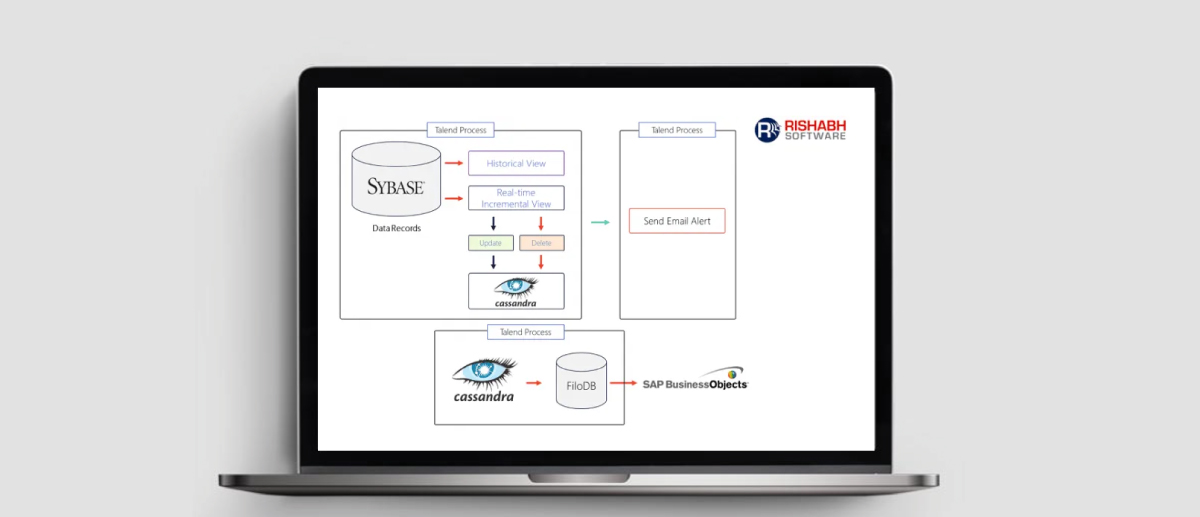
A US-based fleet management enterprise running a diverse fleet of vehicles turned to Rishabh Software to streamline its data processing and reporting.
Challenges
- Designing the architecture for data updates and inserts into NoSQL databases.
- Managing heavy data loads generated on an hourly basis.
- Adapting to evolving business report data requirements.
Our Approach
- We created efficient models for storing vast data volumes from the fleet vehicles.
- Developed complex data flow designs for handling new and existing records, including full and incremental loads, resulting in over 150 Talend jobs.
- Automated data extraction from IoT devices, vehicles, and databases, ensuring accurate reports.
- Fed transformed data into NoSQL databases to generate precise business reports.
Business Benefits
- Accurate and reliable business reports.
- Streamlined data handling and report generation.
- Reduced manual intervention through TAC scheduling.
- Regular transaction updates via email notifications after the job runs.
Learn more about how our Talend data integration efforts enabled the client to generate actionable business insights with real-time reports.
Transforming Global Sales Reporting with Talend Big Data Integration
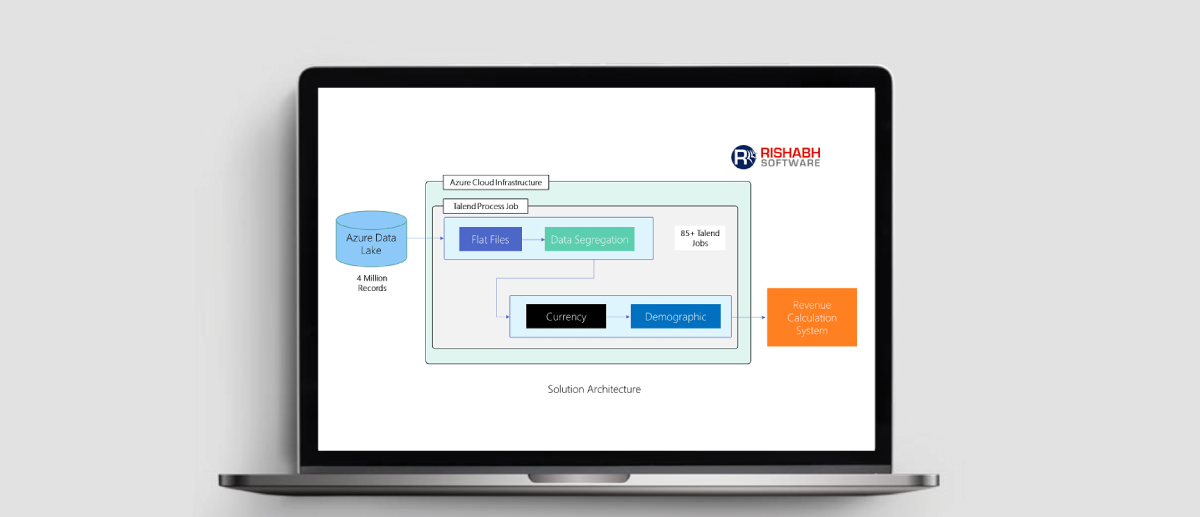
A product based MNC sought automation to streamline their extensive data processing needs, overcome data management challenges, and eliminate redundant and inaccurate data. Their primary goal was to obtain accurate sales reports and revenue calculations based on sales KPIs.
Challenges
- Inability to analyze data in real-time
- Manual, error-prone revenue calculation
- Data redundancy
- Multiple data formats
- Lack of version control (GIT/SVN)
Our Approach
Our big data team orchestrated a Talend data integration solution, seamlessly integrating it with the client’s existing systems. We followed the concept of chained architecture to simplify functionality and facilitate the consolidation of outputs, involving the creation of 85+ Talend jobs. Here’s how we tackled it:
- Data Pre-processing: Eliminated duplicates, case-sensitive formats, and other irrelevant data.
- Business Logic: Applied region and product line differentiation.
- Fiscal Calculation: Calculated the difference between the financial years of the parent company and its clients.
- Revenue Adjustment: Adjusted product and service data in the fiscal year’s revenue calculation.
- Sales and Revenue Computation: Computed sales and revenue figures.
- Input files were on Azure Data Lake Storage, and output was directed to databases or flat files on ADLS.
A dedicated team of 15+ big data engineers, including a testing and integration team, ensured the quality and accuracy of the output.
Business Benefits
- Streamlined revenue calculation process.
- Enhanced performance with precise revenue and sales figures.
- Reduced manual intervention.
Learn more about how our Talend-based big data integration solution empowered the customer to achieve accurate and efficient global sales reporting.
Frequently Asked Questions
Q: What is data integration and why is it important for business analytics?
A: Data integration connects different data sources with different formats to enable unified analysis. Businesses often collect data from multiple sources, which results in data quality issues and redundancy. Breaking down data silos provides context and perspective, making the data more valuable. Effective data integration saves time, reduces errors, enhances data quality, and delivers valuable insights for analysis.
Q: What is the best approach to a data integration solution?
A: The ideal data integration approach would depend on your unique business and user needs. A two-tiered approach, combining staging and data warehouse layers, offers flexibility based on user needs and business requirements.
- Persistent Staging Layer: Integrate data into a centralized location like a data lake or staging layer. This approach allows users to add context during analysis and offers clear lineage.
- Transformation Layer: Integrate data into a dimensional data warehouse, transforming disparate sources into a business context. This approach requires understanding data logic and governance before the data can be optimized for analytics.
Q: What Are the Best Practices for Implementing a Data Integration Solution?
A: To implement a data integration solution that aligns with business goals, follow these best practices:
- Build the Business Case: Clearly define the “why” behind the data integration to solve specific business problems and convey the value in business terms.
- Let Principles Guide the Process: Establish baseline principles to guide technical decisions and avoid over-engineering.
- Assign Roles for Accountability: Designate stakeholders and team members responsible for the integration’s ownership and day-to-day management.
- Select the Right Tools and Techniques: Choose data integration tools and techniques based on business objectives.
By following these best practices, your data integration initiative will ensure easy access for enhanced business operations.
Q: Key Reasons Why Business Need Data Integration?
A: When we bring data from multiple sources and systems, it helps businesses process information more accurately, drive insights from it, and make better decisions at every stage.